No-Code GUI
for Edge Al pipelines
A browser-based flow editor to prototype, connect, and run Machine Learning workflows in real time – powered by the MuseBox Al Server.
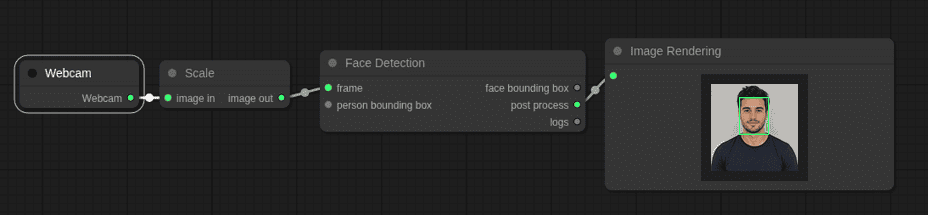
How it works
Create Edge AI workflows visually: connect inputs, AI tasks and outputs without writing code, then run and visualize results in real time.
NO-CODE EXPERIENCE
Simple and Visual Creation
MuseBox No-Code GUI makes Edge AI workflow creation simple and visual. Users can build AI pipelines directly from the browser by connecting input sources, AI tasks and output nodes through an intuitive drag-and-drop interface.
Input Config
Plug-and-play support for RTSP, USB cams, LiDAR, and industrial MQTT sensors.
AI Tasks
Choose from pre-optimized models such as YOLO detection, pose estimation, OCR and so much more…
Output Management
Push results directly to WebSockets, RabbitMQ, or robotic frameworks like ROS2.
Rapid Deployment
Deploy to remote edge devices in one click, with built-in health monitoring.
Why MuseBox no-code GUI?
Accelerating development from months to days.
X
Traditional Development
✔